User model
AgentData is multi-tenant from the ground up. This page explains the pieces that decide who can do what, and on whose data: roles, categories, tenants, membership, projects, and how a request is authenticated and scoped.
Roles
Every user has one role. Roles are ranked viewer < editor < admin < super_admin, and a centralised guard maps each API route to a minimum role.
| Role | Can do | Cannot |
|---|---|---|
| super_admin | Everything, across all tenants: manage tenants, adapters, coupons, shared sources; browse any tenant. | — (self-lockout is prevented) |
| admin | Manage their tenant — users, projects, config, security; add connections; create projects; invite users. | Assign admin/super-admin; touch other tenants |
| editor | Rescan sources; build entities, models and flows; run natural-language and structured queries; use the Data API. | Add connections; manage users |
| viewer | Run structured metric queries; see how queries are built; connect MCP; comment on queries; manage own API keys. | LLM-heavy actions — natural-language generation, rescan, building |
Two deliberate boundaries worth calling out:
- Adding a connection is admin-only. Editors build on top of connections; they don't create them.
- Natural-language query is editor-and-up, because it spends an LLM call. Viewers still query through the metric builder (no LLM) and can connect MCP clients — so a read-only user is genuinely useful without incurring model cost.
See Roles for the endpoint-level summary.
Categories
A category is a per-user, per-tenant data-access label — orthogonal to role. Role is what you can do; category is which slice of data you work with.
- Default is
global(always present). - An admin adds categories for their tenant —
hr,finance,operations, … — in Settings → Users → Categories. - Each user has exactly one category. Delete a category and its users fall back to
global.
Categories give you a logical axis to scope connection data by team, independent of the permission model.
Tenants
A tenant is an organisation — a hard data-isolation boundary. Every row in the system carries a client_id and is filtered by it, so one tenant can never see another's sources, entities, queries or users.
- Signup is invite-only by default (a super-admin can open self-service registration). A brand-new self-signup creates a private, single-user tenant and makes that user its admin; new tenants can be granted a welcome credit.
- Billing is per tenant: an LLM balance, a cost multiplier (billed = real cost × multiplier), and top-ups. When a metered tenant hits zero, LLM calls are blocked until it's topped up (via a super-admin top-up or a redeemed coupon). Usage is always billed to the tenant the work is done in.
Multi-tenant membership
A person often works across organisations — a consultant, a shared analyst, a partner. AgentData models this without duplicate accounts:
- Every user has a home tenant (their
client_idand role). - They can additionally be a member of other tenants, each membership carrying its own role.
- A sidebar tenant switcher (shown only when you belong to more than one) changes your active tenant. Everything — the data you see, the project you're in, and who gets billed — follows the active tenant.
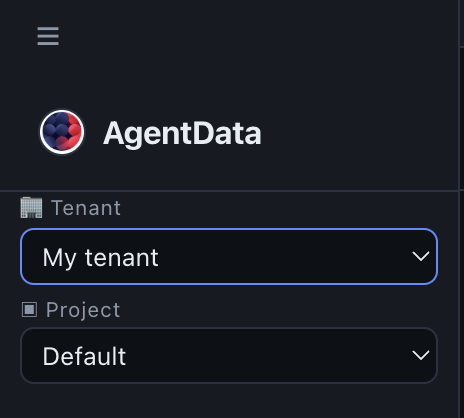
An admin brings an existing user into their tenant by inviting their email — the invite grants a membership instead of erroring on the duplicate. A super-admin can grant or revoke memberships directly. Roles conferred this way are clamped: super_admin is never grantable through an invite or a membership — it's a system-wide role only a super-admin can set directly. Switching into a deactivated tenant is refused.
Projects
Within a tenant, projects partition resources — connectors, flows, models, saved queries — into workspaces, each with its own members. Entities, models and queries are isolated per project; a resource not assigned anywhere lives in the tenant's default project. Projects can be cloned from one another (keeping lineage) and published to everyone or to selected users. See Administration → Projects.
Membership picks the tenant; the project picker narrows to a workspace within it. Super-admins additionally use the project picker to reach across tenants.
Authentication
- Email + password (bcrypt-hashed) or Google sign-in (Google Identity Services ID-token — no redirect/callback/secret to manage).
- Sessions use a signed access token sent as
Authorization: Bearer …. The token identifies the user; the active tenant is chosen per request by theX-Active-Tenantheader, so switching tenants never means re-logging-in. - MCP API keys are per-user, carry their tenant, and can be scoped (
read/query/flows) and optionally bound to a project. Web MCP connectors (claude.ai, ChatGPT) authenticate via OAuth 2.1 + PKCE. Keys are stored only as hashes and are protected by brute-force lockout. See MCP server and Authentication.
How a request is scoped
Putting it together, every request resolves to a precise context:
- The bearer token identifies the user.
X-Active-Tenantpicks the tenant (home, or a tenant they're a member of) → sets the effectiveclient_idand role, and the billing target.X-Project-Idnarrows to a project workspace (default if absent).- The role guard checks the route against the effective role; category and project scope which data is visible.
The result: the right person, acting with the right role, on exactly the right slice of the right organisation's data.
Next steps
- Administration — the screens that manage all of the above
- Roles — endpoint-level capability reference
- Security — isolation, egress policy and auth posture