Quick start 2 — enrich leads → HubSpot → get notified
Goal: an Agent Flow that takes a thin company list, enriches it with Hunter / Apollo, writes the result into HubSpot, and keeps the team in the loop over Slack. ~15 minutes.
Connectors: HubSpot + Hunter/Apollo → Agent Flows: enrich flow + schedule → Slack: run alerts + ask about the list
1. Connect the three providers
Connectors → + Add source — each needs only an API key:
- HubSpot — a Private App token (read and write contacts & companies: the flow writes back).
- Apollo.io — people/company enrichment, domain-driven.
- Hunter.io — email discovery for a domain.
2. Build the flow (Agent Flows → Flows)
Open Agent Flows. In the Flows tab, + New flow:
- Source step — your seed list: HubSpot companies, a CSV from a file store, or an Apollo prompt ("SaaS companies, 50–200 employees, US").
- Enrich step — add Hunter/Apollo as a step; each row goes out with its domain and comes back with contacts, titles and company size.
- Target step — HubSpot write-back: map the enriched columns onto contact/company properties. (Or land a CSV first and import manually — your call.)
- ▶ Run now to test on a small batch, then set a schedule (e.g. every morning at 07:00).
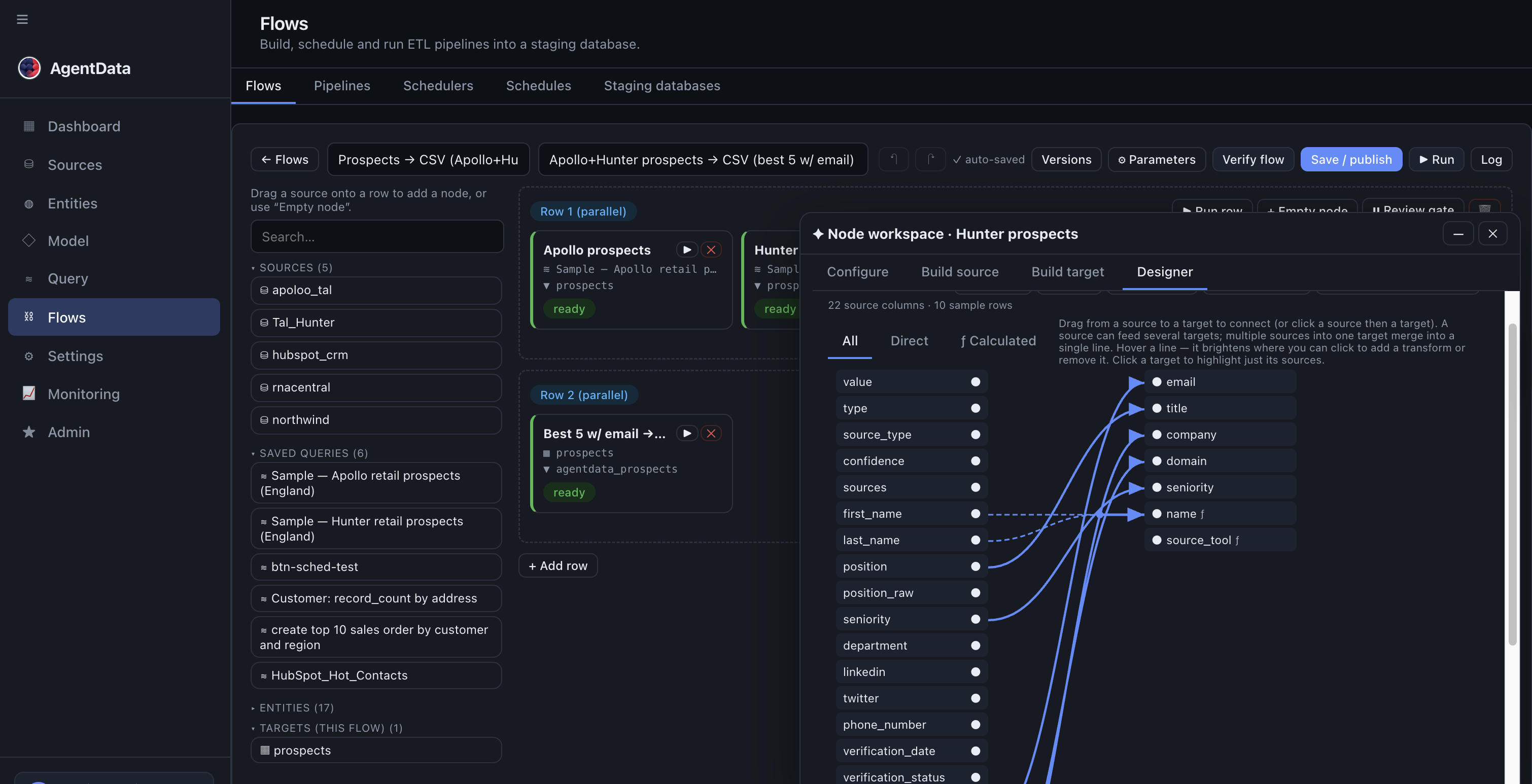
Rows stream through in chunks — a big list won't blow memory — and every run is logged with per-step counts.
3. Send the messages
Two built-in ways to close the loop, both under Settings & Monitoring → Settings:
- Run alerts (Settings → Flows) — set the alert policy and a Slack webhook (and/or email): every failed run — or every run, if you choose always — posts a summary message. No more silent breakage.
- Slack channel (Settings & Monitoring → Settings → Channels) — connect the Slack app and your team can ask about the data from Slack: "how many new contacts did we enrich this week?" runs the same governed NL query engine and answers in-channel. Teams and WhatsApp work the same way at capability level.
4. Verify
- Agent Flows → Flows → Runs shows each run's per-step counts and errors; Monitoring has the cross-flow feed.
- In HubSpot, the enriched properties appear on the contacts — the flow is idempotent, so re-runs update rather than duplicate.
The full click-by-click walkthrough (staging DBs, file stores, dedupe patterns, screenshots for every step) is AI lead enrichment → HubSpot.
Existing workflows and safe follow-up
For the local test installation, select Local Install and choose staging test_tal in Agent Flows. Definitions live in that staging database, not your private home workspace. A successful preview does not send messages. Configure an explicitly authorized messaging step and test its recipient mapping before enabling an outreach workflow. Enterprise identity cutover may quarantine shared-credential Flows until certified subject-scoped execution is available.