MCP server
AgentData ships a built-in Model Context Protocol server so AI clients can query your data directly — no glue code. It uses the same semantic model and authorized query paths as the REST API. Query results are returned to the connected client, which may use them in its AI conversation according to that client's configuration.
Endpoint
https://agentdata.mdm.biskilled.com/mcp/
Streamable HTTP, authenticated with your API key (or OAuth for web connectors).
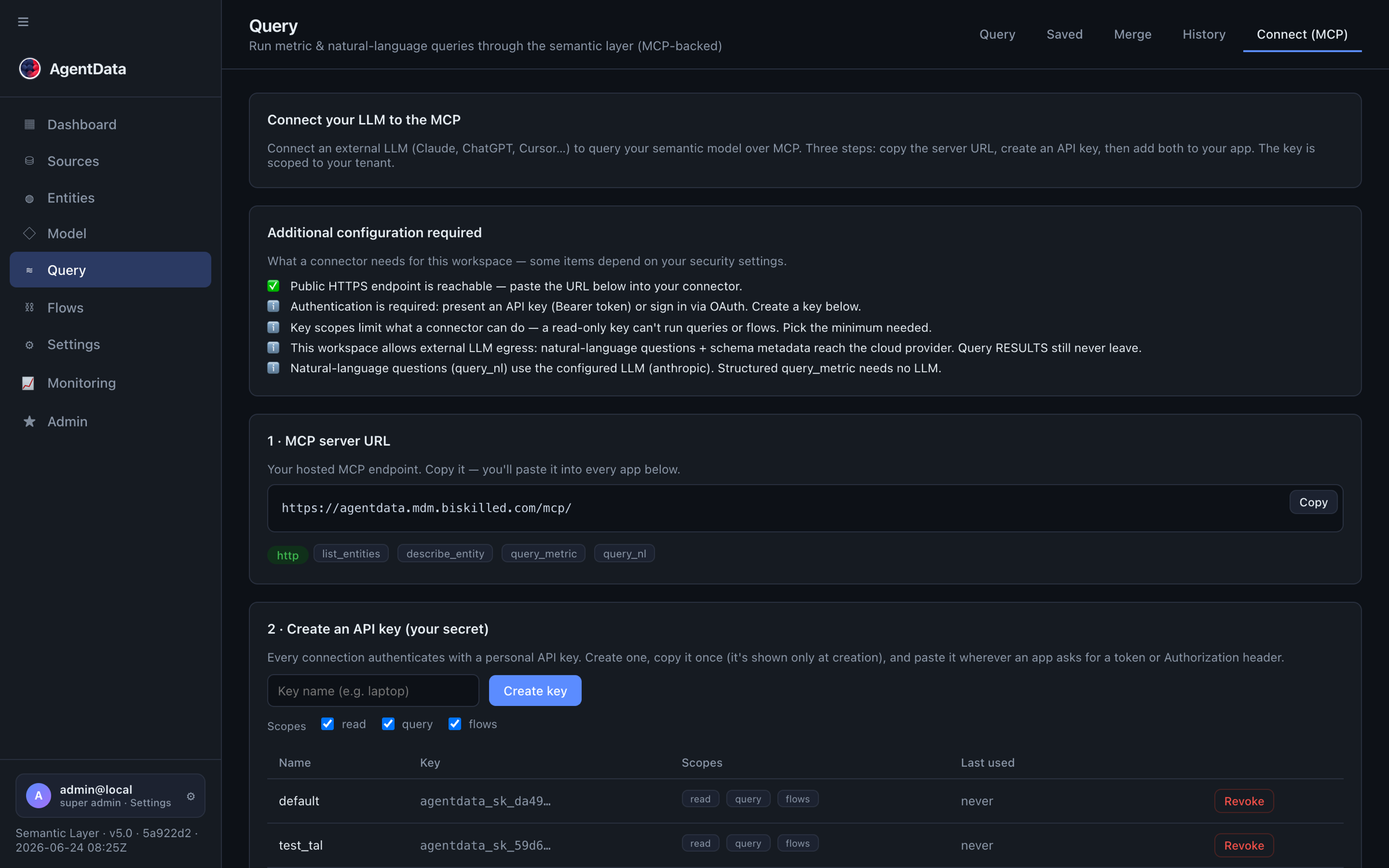
The Conversation → Query → Connect (MCP) screen gives you the server URL, lets you create scoped API keys, and shows ready-to-paste config for Claude, ChatGPT, Cursor and the CLI:
Connect a client
Claude Desktop / Claude Code — add to your MCP config:
{
  "mcpServers": {
    "agentdata": {
      "url": "https://agentdata.mdm.biskilled.com/mcp/",
      "headers": { "Authorization": "Bearer agentdata_sk_…" }
    }
  }
}
Web connectors (claude.ai, ChatGPT) — add the URL as a custom connector; they'll complete the OAuth flow automatically.
Tools
| Tool | Arguments | Returns |
|---|---|---|
list_entities | status (default confirmed) | Entities with their measures and dimensions |
describe_entity | entity_name | Full detail: labels, role, measures, dimensions, attributes, bindings, sample queries |
query_metric | entity, measures[], dimensions[], filters[], time_range, order[], limit | data, row_count, generated_sql, engine, chart_url |
render_dashboard | title, panels[] with a title, semantic query and optional view | Interactive charts/tables in compatible MCP Apps clients; structured and text results elsewhere |
query_nl | question | data, row_count, generated_sql, notes, chart_url |
list_saved_queries | — | Saved query templates |
run_saved_query | name | Result of a saved query |
list_flows / run_flow | name | List / run an ETL flow |
A typical agent flow: call list_entities to see what's available, describe_entity to learn an entity's measures, then query_nl or query_metric to get the answer. These map directly to the REST endpoints in the API Reference.
A note on two MCP servers
AgentData's MCP server queries your data. It's different from AgentDesk's MCP server, which exposes a codebase's project memory to your AI coding tools. Same protocol, different job.
Interactive dashboards
In a client supporting MCP Apps, ask:
Use AgentData to show revenue by region and the monthly trend together in an interactive dashboard. Discover the available entities and fields first.
The agent calls render_dashboard with real semantic fields. Each panel can show a bar chart, line chart, table or a single value. You can switch the category/measure, search rows, sort table columns, or click a category to filter panels containing that field. Refresh data reruns the original queries with your current permissions.
Filters within the dashboard apply only to returned rows. They do not query additional records or recalculate an unrestricted total. A warning appears when a query reaches its row limit. Panels without the selected field are unchanged. For a server-side filter, ask the agent to change the query filters and generate the dashboard again.
The default limits are 12 panels and 500 rows per panel; your administrator may configure different limits. A single-value panel requires one result row. Under Query and source, inspect the entity, requested fields, filters and limit. Query warnings remain visible.
The dashboard follows your client’s light or dark theme, including search fields and dropdowns. If an older dashboard still has unreadable controls, ask the agent to generate a new dashboard after reconnecting AgentData.
For monthly results, ask explicitly for revenue grouped by month. In a structured query, use time_range: {"dimension": "<your date field>", "granularity": "month"}. You can omit from and to for all dates. Grouping also supports day, week, quarter and year; a week starts on Monday. Selecting the raw date field alone returns individual dates.
Clients without MCP Apps rendering still receive the query values as structured data and readable text. Support varies by client. The current release does not provide saved dashboard layouts, scheduled dashboards or a full Hex-style notebook editor.
Connect Hex
Hex supports custom MCP servers through its External Apps feature, currently documented as beta on Team and Enterprise plans. This lets Hex's agent use AgentData tools; embedded MCP App rendering inside Hex has not been verified. See Hex's setup guide.
- In AgentData Connect (MCP), create an API key with Read and Query scopes and select the intended project.
- In Hex, an administrator opens Settings → Integrations → Custom MCP server and enters the MCP URL shown by AgentData.
- Choose User provided → Bearer token. Each user connects with their own AgentData key.
- Enable the discovery and analytical tools you need, including
list_entities,describe_entity,query_metric,query_nlandrender_dashboard. - Ask Hex's agent to inspect an entity and query its data. Its access follows that user's AgentData key and project binding.
Use results in a Hex notebook
For Python/DataFrame analysis, use AgentData's existing saved-query Data API. Keep the key in Hex's secret store. The example below reads environment variables; adapt those three reads to Hex secret/input variables if your workspace exposes secrets that way. AGENTDATA_API_URL is the REST backend origin, and AGENTDATA_QUERY_NAME is an existing saved analytical query available to the key. It is not a native PostgreSQL connection.
import os
from urllib.parse import quote
import requests
import pandas as pd

base = os.environ["AGENTDATA_API_URL"].rstrip("/")
key = os.environ["AGENTDATA_API_KEY"]
query_name = os.environ["AGENTDATA_QUERY_NAME"]
response = requests.post(
    f"{base}/api/data/run/{quote(query_name, safe='')}",
    headers={"Authorization": f"Bearer {key}"},
    json={"params": {}},
    timeout=120,
)
response.raise_for_status()
result = response.json()
if result.get("notes"):
    print(result["notes"])
agentdata_rows = pd.DataFrame(result.get("data", []))
agentdata_rows
Use the resulting DataFrame for Hex charts and analysis. Check query warnings and limits before treating it as a complete dataset. This connection recipe has been validated against AgentData's API contract; a connection inside your Hex workspace still needs an account-level test.